KDP Cover Calculator Tool
Enter Your Book Information
Number of pages at your formatted trim size.
| # | Description | Width (in) | Height (in) |
|---|---|---|---|
| 1 | Full Cover | – | – |
| 2 | Front Cover | – | – |
| 3 | Safe Area | – | – |
| 4 | Bleed | – | – |
| 5 | Margin | – | – |
| # | Description | Width (in) | Height (in) |
|---|---|---|---|
| 6 | Spine | – | – |
| 7 | Spine Safe Area | – | – |
| 8 | Spine Margin | – | – |
| 9 | Barcode Margin | – | – |
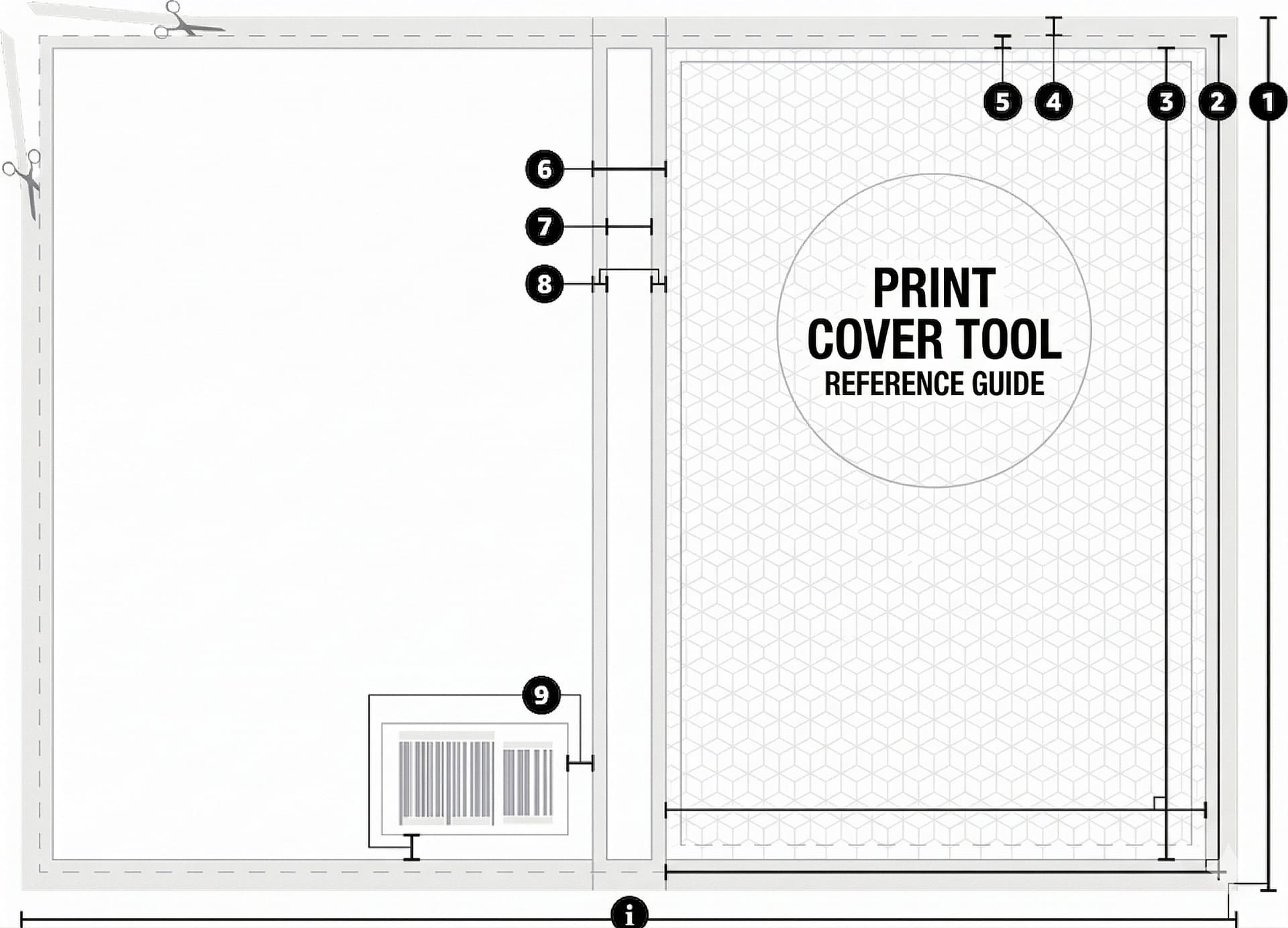
This tool helps you calculate full cover size, spine width, bleed, and margins for paperback and hardcover books published on Amazon KDP. If you need professional help, check our KDP Book Formatting Services.
How to Use the KDP Cover Calculator:
- Select binding type (Paperback or Hardcover)
- Select interior type (Black & White or Color)
- Select paper type (White or Cream)
- Select trim size
- Enter page count
- Click Calculate
- Download your print-ready cover template
Your KDP Cover Dimensions Explained
Full Cover Size – Total width and height, including front cover, back cover, and spine.
Front Cover – The front side of your book cover.
Back Cover – The back side, where the book description and barcode go.
Spine Width – Calculated based on page count and paper type.
Bleed Area – Extra 0.125″ area to prevent white edges after trimming.
Safe Area – Keep all important text inside this area to avoid trimming.
KDP Cover Size Formula
Cover Width = (Trim Width × 2) + Spine Width + (Bleed × 2)
Spine Width Formula
Spine Width = Page Count × Paper Thickness
Common KDP Cover Mistakes to Avoid
- Wrong cover size exported
- Incorrect spine width
- Text too close to trim edge
- No bleed area
- Low-resolution images (less than 300 DPI)
- Barcode placed in the wrong area
Why Use This KDP Cover Calculator?
- Instant cover size calculation
- Accurate spine width
- Bleed and margin included
- Print-ready template download
- Saves time and avoids KDP rejection
- Beginner-friendly tool
Who Should Use This Tool?
- Self-publishing authors
- Amazon KDP publishers
- Book designers
- Print-on-demand publishers
- Book formatting professionals
If you are not sure how to format your book for publishing, you can explore our Print Book Formatting Services and eBook Formatting Services.
Need Help with Book Formatting or KDP Upload?
We provide Amazon KDP Formatting, Print Book Formatting, and eBook Conversion Services for authors and publishers worldwide. Visit our Portfolio to see our work or Contact Us to get a quote.
Services We Offer:
- Print Book Formatting
- eBook Formatting
- eBook Conversion
- KDP Upload Ready Files
Amazon KDP Cover Size Calculator
Our Amazon KDP Cover Size Calculator helps authors and publishers calculate accurate cover dimensions, including spine width, bleed, and margins. This tool is designed to make the cover design process easy and error-free for self-publishing on Amazon KDP.
Frequently Asked Questions (FAQ)
What is a KDP Cover Calculator?
A KDP Cover Calculator is a tool that calculates print cover size, spine width, bleed, and margins for paperback and hardcover books.
How is spine width calculated in KDP?
Spine width is calculated based on page count and paper type. More pages mean a wider spine.
What is bleed in KDP cover design?
Bleed is an extra 0.125 inches added to each side of the cover so that the design prints to the edge without white borders.
What file format is required for KDP print cover?
KDP requires a print-ready PDF with 300 DPI resolution, CMYK color, and embedded fonts.
Is this KDP Cover Calculator free?
Yes, this is a free tool for authors, publishers, and designers.
Looking for professional formatting? Visit our Book Formatting Services page to learn more.
Why Choose Us?
- 14+ years of experience in book formatting
- 3000+ clients worldwide
- 500+ projects completed on Upwork
- Amazon KDP formatting experts